Pokémon · English cards
How to Tell If Your Pokémon Card Is Rare
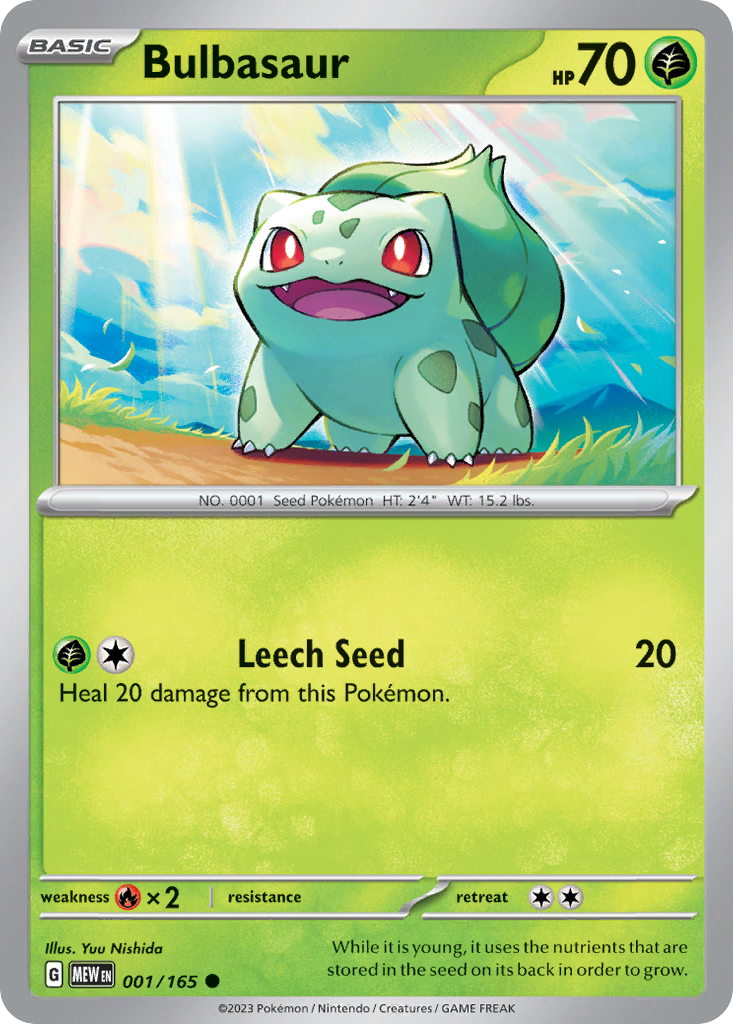
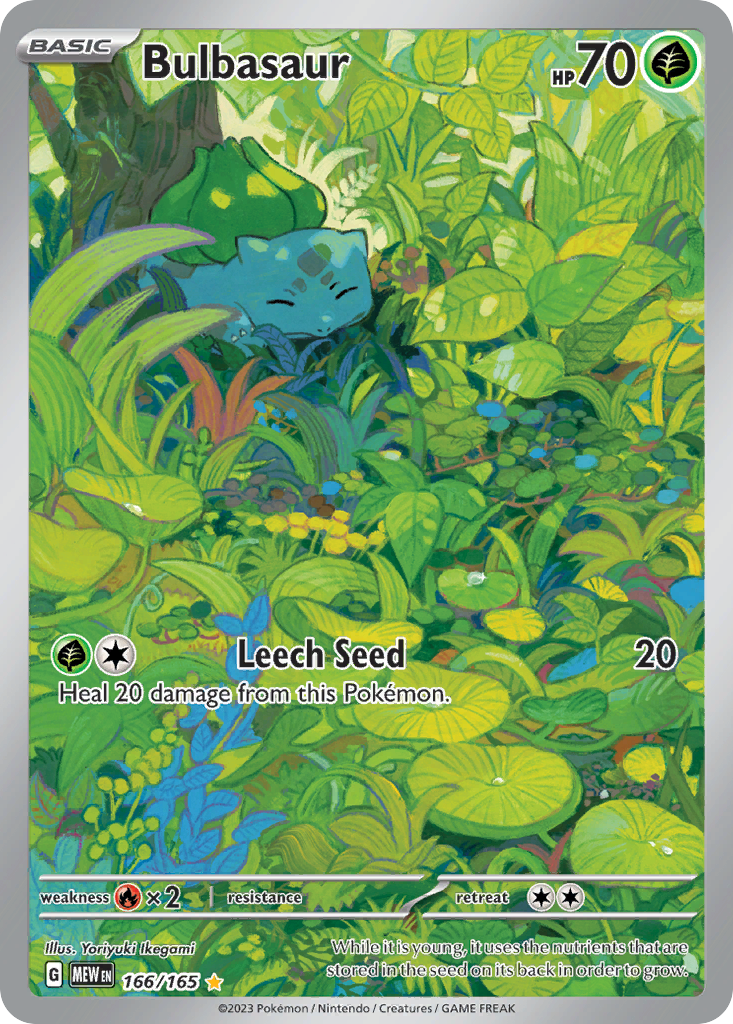
Look along the bottom edge of your card for the symbol beside its collector number. On these two English Pokémon 151 cards, the black circle means Common and the gold star means Illustration Rare.
1. Find the rarity symbol
Symbols vary by set. If yours looks different, match the card number and artwork in the English Pokémon catalog.
Hold the card upright and look along the bottom edge, beside the collector number. In our English Scarlet & Violet—151 examples, these details sit at the lower left. Older cards can place them at the lower right, as described in Pokémon Support’s card database guide.
For this Scarlet & Violet set, read the symbol’s shape, color, and number of stars together:
- Black circle
- Common
- Black diamond
- Uncommon
- One black star
- Rare
- Two black stars
- Double Rare
- Two silver stars
- Ultra Rare
- One gold star
- Illustration Rare
- Two gold stars
- Special Illustration Rare
- Three gold stars
- Hyper Rare
Source: Pokémon’s official English 151 checklist and rarity legend (PDF). This is a Scarlet & Violet-era key, not a complete key for every era. Older sets and special releases can use other categories; check that expansion’s official checklist. A foil surface alone does not tell you the rarity.
2. Read the whole collector number
Read both sides of the slash. On Bulbasaur 001/165, 001 is the card’s number and 165 is the set’s main numbering total. Bulbasaur 166/165 is numbered beyond that total. That is a useful clue to a different version, but the rarity symbol gives its rarity label.
Match the expansion too: numbers can repeat in different sets. On these cards, MEW EN is the English 151 set identifier. The nearby boxed G is a regulation mark, not a rarity symbol or a condition grade. The “NO. 0001” in the standard card’s Pokémon description is its Pokédex number, not its collector number.
Same Pokémon. Two different cards.
Both examples are English Bulbasaur cards from Scarlet & Violet—151 (2023). Compare the full artwork first, then look at the enlarged lower-left corner.
Look here · lower-left corner
001/165 is followed by a black circle: Common. MEW EN identifies the English 151 set; the boxed G is a regulation mark, not the rarity.
Bulbasaur 001/165
Scarlet & Violet—151 · English
Common · Normal (non-foil)
Look here · lower-left corner
166/165 is followed by one gold star: Illustration Rare. The number exceeds 165 and the artwork fills the card. Match all three clues together.
Bulbasaur 166/165
Scarlet & Violet—151 · English
Illustration Rare · Holofoil
Card images show the artwork and printed identifiers; a flat image cannot demonstrate the foil effect. Check the finish on your physical card. Artwork © Pokémon / Nintendo / Creatures / GAME FREAK.
3. Match the artwork and finish
Compare the picture, border, language, and any stamps with the catalog image. The two Bulbasaur cards above have the same name and attack, but different artwork, collector numbers, and rarities. Choose the exact card rather than the first result with the right Pokémon name.
Gently tilt your card under a light to check its finish. A non-foil card does not have a reflective foil layer; reverse holofoil has a reflective pattern outside the illustration. Bulbasaur 001/165 has Normal and Reverse Holofoil options in CardBento. The example link selects Normal; 166/165 selects Holofoil. A finish can change while the number and rarity stay the same.
If your card has an extra stamp or a different foil pattern, keep looking for that exact printing. These examples show the unstamped English 151 cards, not a stamped promotional version. A visual match helps identify a printing; it does not authenticate a card.
4. Check the exact card’s price
Search the English Pokémon catalog using the name and collector number, then confirm the set and artwork. Open the detail page and check Selected printing before comparing its market price and available listings. The example links above open the verified finish with the English Near Mint listing option selected; choose the condition that matches your card when comparing offers.
Have the card in front of you? Scan your Pokémon card with your camera. Keep the full card in view, then confirm the matched artwork, collector number, and finish before checking its price.
Why rarity alone doesn’t determine price
Rarity describes a card’s category within its release, not a dollar value. Demand for the Pokémon or artwork, the supply of that printing, and the card’s condition all affect what someone will pay. Two cards with the same rarity can have very different prices, and a sought-after Common can still be worth checking.
Use the current price and update date on the detail page. A market estimate is a reference, not a guaranteed sale price; compare the same finish, language, and condition, and check shipping and tax when evaluating an offer.
Find your card by name or camera
Search the English catalog or use the camera scanner, then confirm the printing and check its latest available price.